
A practical guide to bulk resume formatting software for staffing and recruitment agencies — how to format multiple candidate CVs at once, maintain branding consistency, and scale submission volume without extra admin overhead.
Sourcing is going well. The candidate pipeline is strong. And then comes the moment every high-volume recruiter dreads: the shortlist of ten candidates that all need to be formatted, branded, and ready to send — by this afternoon.
One by one, manually, twenty minutes each. That's over three hours of formatting work before a single submission goes out.
Bulk resume formatting software solves this problem directly — by allowing recruitment teams to upload and format multiple candidate CVs simultaneously, applying the agency's branded template to all of them in a single batch, in minutes rather than hours.
For staffing agencies and recruitment firms processing high candidate volumes, the difference between one-at-a-time formatting and batch processing isn't marginal. It's the difference between a submission process that scales and one that becomes a bottleneck the moment the team gets busy.
The Volume Problem in Staffing and Recruitment
Not every agency has a bulk formatting problem. But most do — and they may not have quantified it.
Consider the maths.
A recruiter processing 5 CVs a day, 5 days a week, at 15 minutes per CV, spends over six hours a week on formatting alone. Across a team of four recruiters, that's 24 hours a week — three full working days — absorbed by a task that produces no direct placement value.
At higher volumes the numbers compound further. Staffing agencies filling temporary and contract roles often process 50, 100, or more candidate CVs in a single week. High-volume sourcing campaigns — where a recruiter is shortlisting candidates for a large employer or running an RPO mandate — can generate batches of 20 or more CVs that all need to be formatted and sent in the same window.
Manual formatting at this volume is not a workflow. It's a firefight. And it consistently trades off against the work that actually moves placements forward: sourcing new candidates, managing client relationships, and progressing live roles.

What Bulk Resume Formatting Software Actually Does
Bulk resume formatting software allows recruiters to upload multiple candidate CVs at once and format all of them against the agency's branded template in a single processing run.
The recruiter selects a batch of CVs — PDFs, Word documents, scanned images, a mix of formats — uploads them together, and the software parses each document, extracts the candidate's content, and applies the template to every CV in the batch. The output is a set of formatted, branded, client-ready documents — processed in minutes, not hours.
This is distinct from a template file that a recruiter applies manually to each CV. Bulk formatting software automates the conversion step for every document in the batch simultaneously. The recruiter isn't working through a queue one document at a time. They're uploading a stack and collecting formatted output.
What to Look for in Bulk Resume Formatting Software
Not all platforms that describe bulk formatting capabilities are equally fit for recruitment agency workflows. When evaluating options, agencies should look for a specific set of capabilities.
True batch processing — not just faster one-at-a-time
Some platforms describe bulk processing but still require the recruiter to initiate formatting for each CV individually, even if they're uploaded at the same time. True batch processing means the recruiter uploads multiple files and all of them are formatted in the same run — without clicking through each one separately.
High parsing accuracy across the whole batch
Parsing accuracy matters more in bulk processing because errors multiply. If a platform's parsing is 90% accurate and a recruiter is formatting ten CVs at once, they're likely correcting multiple documents before the batch is usable. A platform operating at 98%+ accuracy keeps manual correction to a minimum regardless of batch size.
Any-format input support
In a real recruitment environment, a batch of CVs will contain a mix of formats. Some candidates send PDFs. Some send Word documents. Some send scanned images. A bulk formatting platform that only handles one or two input formats forces the recruiter to pre-sort or convert files before uploading — which defeats the purpose of batch processing.
Branded template applied consistently across all output
Every CV in the batch should come out in the agency's branded template — not a generic layout, not a slightly different version applied inconsistently. The value of bulk formatting is not just speed but consistency: every formatted document in the batch meets the same standard.
Speed that fits real submission timelines
A batch of ten CVs that takes twenty minutes to process isn't useful when a client is waiting for a shortlist this afternoon. The processing speed needs to match the urgency of real recruitment workflows.

How CVFormatter Handles Bulk Resume Formatting
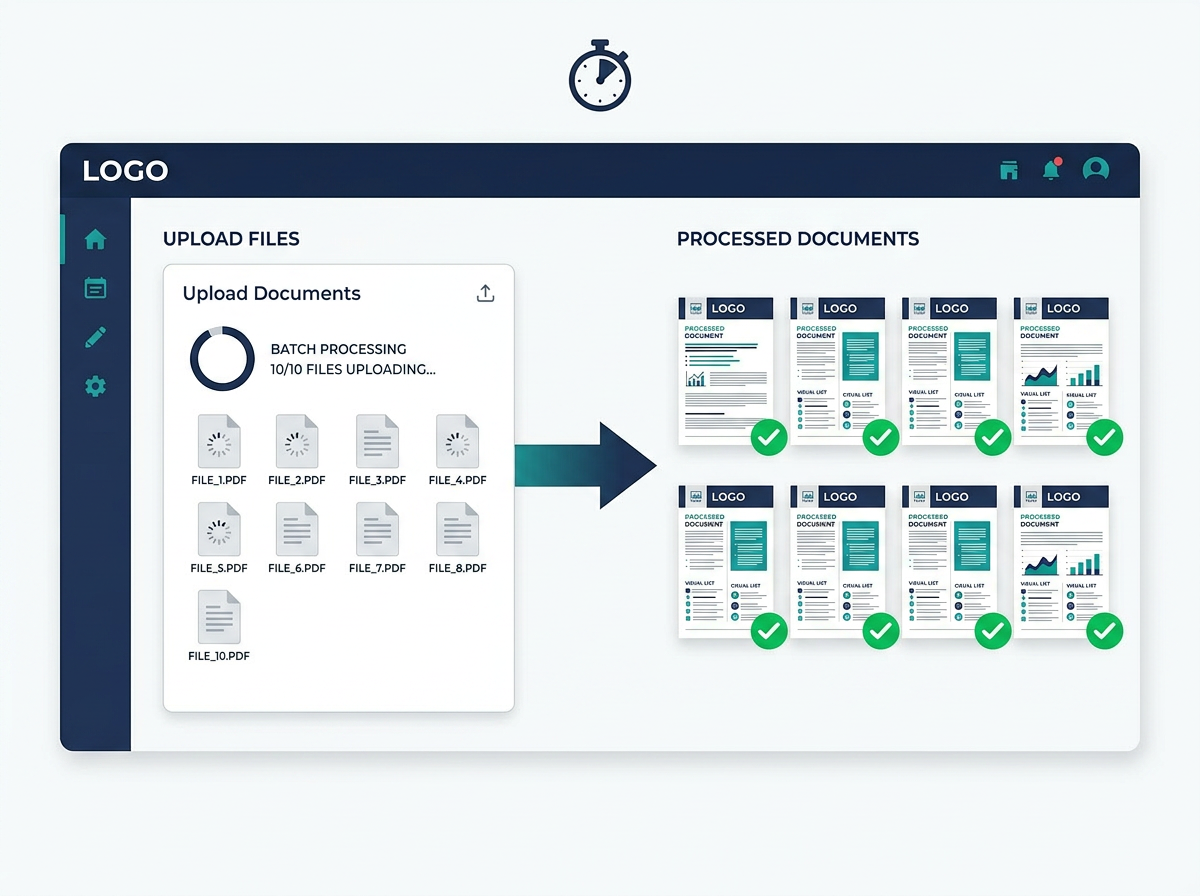
CVFormatter supports uploading up to 10 candidate CVs in a single batch. All ten are formatted simultaneously, applying the agency's branded template to each document — and the entire batch is processed and ready in minutes.
For a recruiter building a shortlist, this changes the workflow entirely. Instead of formatting each CV one at a time — opening, converting, checking, exporting, moving to the next — the recruiter uploads the batch, reviews the formatted outputs, and the shortlist is ready.
Start your free trial here.
Any format, processed together
CVFormatter accepts PDF, DOCX, PNG, JPEG, and JPG files in the same batch. A recruiter doesn't need to pre-sort the candidate files by format before uploading. The platform handles the conversion for every file in the batch regardless of what format each one arrived in.
This matters in practice. A real shortlist batch rarely contains ten identical-format files. It contains a mix of whatever the candidates sent — and the formatting software needs to handle that without requiring any preparation on the recruiter's side.
98%+ parsing accuracy across the batch
CVFormatter's parsing operates at 98%+ accuracy — applied consistently to every document in the batch, not just the cleanly formatted ones.
At this accuracy level, the recruiter reviews the output for each CV but is rarely correcting systematic errors. The formatted documents are correct the vast majority of the time. The review step is a quality check, not a correction session.
The agency's branded template on every document
Every CV in the batch comes out in the agency's template. Same logo. Same colours. Same typography. Same layout structure. Same section order.
A shortlist of ten formatted CVs looks like it was produced by one organisation operating to a consistent standard — because it was. The client receives ten documents that all carry the agency's brand identity, presented in the same way, readable in the same sequence.
This is the consistency benefit of bulk formatting software that manual processing can never fully deliver. Even the most careful manual formatter will introduce subtle variation across ten documents formatted under time pressure.
Batch review before export
After the batch is processed, CVFormatter allows the recruiter to review each formatted CV before exporting. The whole batch doesn't have to be exported blindly — the recruiter can check each output, make any adjustments, and export individually or as a full batch when the review is complete.
This keeps quality control in the recruiter's hands without requiring them to process each document individually from the start.
Bulk Formatting in the Context of a Full Submission Workflow
Batch CV formatting is one step in a broader submission workflow. For high-volume agencies, the other steps in that workflow also benefit from the same platform.
After formatting a batch, recruiters often need to:
- Proofread candidate CVs for grammar and spelling errors before submission
- Rewrite weak bullet points or generate professional summaries for candidates who aren't strong writers
- Anonymise CVs for clients who require blind submissions
- Translate CVs for international placements where the source document is in a different language
CVFormatter's AI enhancement tools cover all of these — available in the same interface, applied after the batch formatting step, before export. The recruiter doesn't switch between platforms to complete the workflow. Formatting, enhancement, and export happen in one place.
For a team processing large volumes regularly, this integration matters. Every additional tool the recruiter has to switch to adds friction. A platform that handles the full quality workflow — format, enhance, check, export — in one interface compounds the time saving beyond the formatting step alone.

The ROI of Bulk Resume Formatting Software
The numbers are clear and the maths is simple.
A staffing agency processing 200 CVs per month manually — at 15 minutes per CV — is spending 50 hours a month on formatting. That's over six full working days, absorbed entirely by admin.
With CVFormatter's batch processing — up to 10 CVs uploaded simultaneously, formatted in minutes — the same 200 CVs take a fraction of that time. Users consistently report cutting formatting time by 70–90%.
At CVFormatter's Monthly Premium pricing of $299/month for 500 CVs, the per-CV cost is $0.60. For an agency spending even $30/hour on recruiter time, recovering 40+ hours per month from formatting admin represents over $1,200 in time value recaptured — before the consistency, branding, and quality benefits are counted.
CVFormatter holds a 4.9/5 rating on G2, with users specifically noting the speed and consistency of formatted output as the primary driver of value. One reviewer described the platform as having "significantly reduced the administrative burden" — and the bulk processing capability is a core part of why.
Who Benefits Most From Bulk Resume Formatting Software
Bulk formatting capability matters most for specific types of agencies and workflows.
High-volume staffing firms filling temporary and contract roles, where candidate throughput is high and individual formatting time multiplies across large weekly volumes.
RPO teams and talent outsourcing providers running large hiring campaigns for enterprise clients, where batches of candidates are processed against specific roles and shortlists need to go out quickly.
Executive search firms preparing multi-candidate shortlists where every document in the batch needs to reflect the firm's premium presentation standard — consistently, not just when the recruiter has time to be careful.
IT consulting firms submitting consultant profiles for multiple live RFPs simultaneously, where several profiles need to be formatted and sent in the same window.
Growing agencies scaling past manual capacity — the point at which one-at-a-time formatting stops being a minor inconvenience and starts being a genuine constraint on how many candidates the team can process and submit per week.
Final Thoughts
Bulk resume formatting software is not a nice-to-have for high-volume recruitment teams. It's a capacity tool — the difference between a formatting workflow that scales with the agency and one that becomes a ceiling on how many candidates can be processed in a given time.
CVFormatter's batch processing — up to 10 CVs uploaded and formatted simultaneously, in minutes, in the agency's branded template — removes that ceiling. The recruiter uploads the stack. The platform handles the formatting. The shortlist is ready.
For teams that spend meaningful time on individual CV formatting today, the shift to batch processing is one of the fastest ways to reclaim recruiter hours and put them back into placements.
Book a free demo to see how CVFormatter's bulk resume formatting works in practice — and how quickly a high-volume submission workflow can change.